All services

Application Development

Custom business applications that run your day-to-day

We design and build custom applications for businesses in Ottawa, Gatineau and Aylmer: one place for the owner to plan the work, for the team to get it done in the field, and for customers to follow their requests.

Who it's for: Service businesses with crews, routes, schedules or customers to coordinate, where group texts, paper sheets and spreadsheets no longer keep up.

Signs an application would make your day easier

The day runs on texts and calls
Crews call to ask where to go next, and you call back to check whether a job is done.
You can't see progress without asking
There's no single screen showing what's finished, what's left and what went wrong.
Paper doesn't travel well
Job sheets, checklists and timesheets get lost, or typed again at the end of the week.
Customer requests are scattered
Sign-ups, requests and questions arrive in different places and take time to sort.

What we can build

Apps for owners and field teams
An owner workspace to plan and follow the work, and simple crew screens that show each person only what they need.
Scheduling, jobs and routes
Jobs, work orders and routes with their stops in order, assigned to the right people and vehicles.
Time tracking
Clock-in, clock-out and breaks recorded from the phone, with hours the owner can review.
Customer portals and booking
Online sign-ups, requests and bookings, with a private space where customers follow what they've asked for.
Connected business tools and automations
The app works with your website and CRM, so a request becomes a job without being typed again.
Designed for phones and tablets
Large buttons and clear screens for a phone in the truck, and wider layouts for a tablet in the office.

A closer look: Weeping Willow

For a landscaping and snow-removal company, we built one application that connects the owner's workspace, the crew's routes and the customers' requests.

Storm tracker
The owner sees every route, stop and problem for a storm on one screen, with totals that add up.
Crew routes
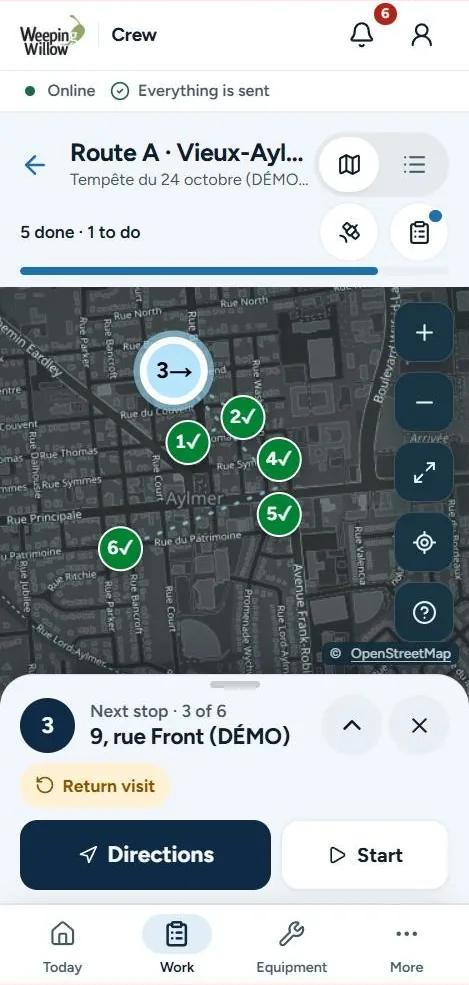
Each crew member sees the next stop, directions, and Start and Done buttons, and can report a problem in a tap.
Work orders and checklists
Jobs carry instructions, checklists and photos, and come back to the owner for review.

Status: built and tested in the app's test environment with sample data; not yet in daily use. The screens on this site come from that environment.

One system, three points of view

A business application works best when each person sees only what they need, and everyone works from the same information.

The owner
Plans the work, assigns it to people and vehicles, and sees what's done, what's late and what needs a decision without calling anyone.
Employees and crews
Clock in, open the next job or stop with its instructions, mark it started or done, add photos and report a problem in a tap.
Customers
Sign up or send a request online, then follow it in a private space instead of calling for updates.

Mobile website, web application or installable app?

Three ways to put software on a phone. The right one depends on who uses it and what it has to do.

Mobile-friendly website
For people who don't know you yet: they find you on Google, read about your services, then book or ask for a quote. No sign-in, nothing to install.
Web application
For signed-in tools such as an owner workspace, crew routes or a customer portal. It opens in the browser on phones, tablets and computers, so there's nothing to install and everyone gets updates at the same time.
Installable app
Downloaded and installed on the phone, with its own icon. Worth it when a tool needs features a browser handles poorly; it also adds store reviews and separate releases. The same application can often start in the browser and be packaged later if needed.

We'll recommend the simplest option that does the job, and explain why.

Applications we've built

Landscaping and snow removal

Weeping Willow

  • Custom app
  • Operations
  • Website
What they needed
One view of each storm, simple tools in the field and client requests in one place.
What we built
One application connecting the owner's workspace, the crew's routes and the customers' space.
In the app
Every route and stop of a storm on one screen
Read the Weeping Willow case study

How a project works

Consultation, proposal, build and launch, then ongoing support if you need it.

  1. Free consultation

    Walk us through a normal day: who does what, where information gets lost and what you'd like to see at a glance.

  2. Scope and proposal

    Agree in writing on the first part to build: the screens, who uses each one, the connections to your other tools and the price.

  3. Design, build and test

    Design the screens, build in stages and test each one with sample data on phones and tablets, then with your team, and launch once you approve.

  4. Ongoing support

    Agree separately on hosting, maintenance and new features as the business grows.

How pricing works

Applications are quoted individually, based on the screens and roles you need, the connections to your website or other tools, and how much existing information needs to be brought in.

We often recommend starting with the part of the day that costs you the most time, then adding to it. Your proposal sets out each stage and its price.

Common questions

Will it work on my team's phones?

We design for phones and tablets first, with large buttons and clear screens, and test on the kinds of devices your team uses.

Can it connect to my website and CRM?

Yes. Where possible the app shares one system with your website and CRM, so a request or sign-up becomes a job without being typed again.

Who can see what?

Access is set by role. Owners see the whole operation; crew members see only their own work. Private screens sit behind sign-in.

Can we start small?

Yes. Many applications start with one part of the day, such as routes or time tracking, and grow from there.

Do I need an app, or would a website and CRM do?

If customers mainly need to find you, book or ask for a quote, a website does that. If the office needs to follow leads, quotes and invoices, a CRM does that. An application makes sense when your team needs its own tools during the day, such as routes, work orders or time tracking, or when customers need a private space to follow their requests.

Does it have to be a downloadable app?

No. Most business tools work well as a web application your team opens from a link or a home-screen shortcut, with sign-in. If your project really needs an app people download and install, we'll explain what that adds before you decide.

Why not use ready-made scheduling software?

Ready-made tools work well for many businesses, and we'll say so when one fits. A custom application makes sense when your work doesn't fit their screens, when your team needs it in both languages your way, or when it has to share one system with your own website and CRM.

What about the information we already have?

Bring your spreadsheets and lists to the consultation. Bringing existing information into the application, such as customers or properties, is planned and priced in your proposal.

Works well with

From the blog

Is there a part of your day an app could take over?

Tell us how a normal day runs. We'll suggest what's worth building first.